


对应路线图:Phase 1 (Day 22-49) | DPDK 24.11.6 LTS | 内核对照 v6.6
代码出处:source/dpdk-stable-24.11.6/lib/eal/,引用均标文件:行号
上一篇:无(系列第 1 篇)| 下一篇:P1-02 mempool
一句话定位
EAL(Environment Abstraction Layer)在用户态复刻了内核启动时做的那些事:CPU/拓扑检测、内存管理、设备枚举、中断处理、线程管理。rte_eal_init()(lib/eal/linux/eal.c:918)就是 DPDK 的 start_kernel。
启动主线:对着真实代码走一遍
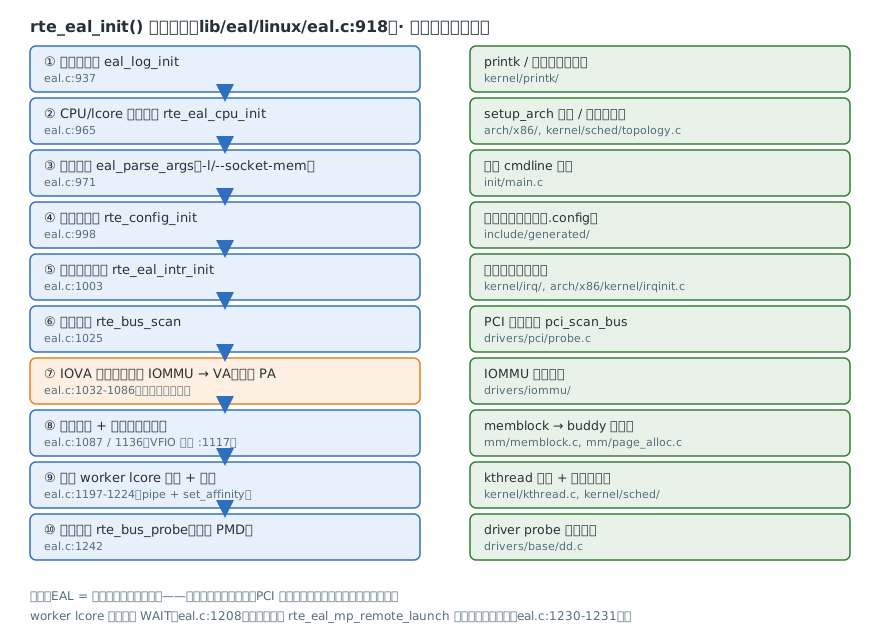
| 步骤 | 真实调用 | 行号 | 内核对应 |
|---|---|---|---|
| ① 日志 | eal_log_init() | eal.c:937 | printk 日志子系统 |
| ② CPU/lcore 检测 | rte_eal_cpu_init() | eal.c:965 | setup_arch 拓扑发现 |
| ③ 参数解析 | eal_parse_args() | eal.c:971 | 内核 cmdline 解析 |
| ④ 运行时配置 | rte_config_init() | eal.c:998 | 编译期 .config |
| ⑤ 中断线程 | rte_eal_intr_init() | eal.c:1003 | irq 子系统 |
| ⑥ 总线扫描 | rte_bus_scan() | eal.c:1025 | pci_scan_bus(drivers/pci/probe.c) |
| ⑦ IOVA 模式选择 | 自动探测逻辑 | eal.c:1032-1086 | IOMMU 使能检测 |
| ⑧ 大页+内存 | rte_eal_memory_init() | eal.c:1087/1136 | memblock → buddy |
| ⑨ worker 线程 | eal_worker_thread_create() | eal.c:1197-1224 | kthread + 调度器 |
| ⑩ 设备探测 | rte_bus_probe() | eal.c:1242 | driver probe(drivers/base/dd.c) |
第 ⑦ 步:IOVA 自动选择(eal.c:1037-1064)
/* if no EAL option "--iova-mode=<pa|va>", use bus IOVA scheme */
if (internal_conf->iova_mode == RTE_IOVA_DC) {
    /* autodetect the IOVA mapping mode */
    enum rte_iova_mode iova_mode = bus_iova_mode;

    if (iova_mode == RTE_IOVA_DC) {
        EAL_LOG(DEBUG, "Buses did not request a specific IOVA mode.");

        if (!RTE_IOVA_IN_MBUF) {
            iova_mode = RTE_IOVA_VA;
            EAL_LOG(DEBUG, "IOVA as VA mode is forced by build option.");
        } else if (!phys_addrs) {
            /* if we have no access to physical addresses,
             * pick IOVA as VA mode.
             */
            iova_mode = RTE_IOVA_VA;
            EAL_LOG(DEBUG, "Physical addresses are unavailable, selecting IOVA as VA mode.");
        } else if (is_iommu_enabled()) {
            /* we have an IOMMU, pick IOVA as VA mode */
            iova_mode = RTE_IOVA_VA;
            EAL_LOG(DEBUG, "IOMMU is available, selecting IOVA as VA mode.");
        } else {
            /* physical addresses available, and no IOMMU
             * found, so pick IOVA as PA.
             */
            iova_mode = RTE_IOVA_PA;
            EAL_LOG(DEBUG, "IOMMU is not available, selecting IOVA as PA mode.");
        }
    }
    rte_eal_get_configuration()->iova_mode = iova_mode;
}读出三层信息:① 有 IOMMU 就用 VA(网卡 DMA 走虚拟地址,P5 讲 DPU 时回来复习);② 优先级是"构建选项 > 物理地址可用性 > IOMMU 检测";③ 这就是 VFIO 绑定后 DPDK 默认跑 VA 模式的原因——rte_vfio_enable("vfio") 在 eal.c:1117。
第 ⑨ 步:worker lcore 怎么诞生(eal.c:1197-1224,节选)
RTE_LCORE_FOREACH_WORKER(i) {
    /*
     * create communication pipes between main thread
     * and children
     */
    if (pipe(lcore_config[i].pipe_main2worker) < 0)
        rte_panic("Cannot create pipe\n");
    if (pipe(lcore_config[i].pipe_worker2main) < 0)
        rte_panic("Cannot create pipe\n");

    lcore_config[i].state = WAIT;

    /* create a thread for each lcore */
    ret = eal_worker_thread_create(i);
    if (ret != 0)
        rte_panic("Cannot create thread\n");
    // ... 设置线程名 "dpdk-worker%d" ...
    ret = rte_thread_set_affinity_by_id(lcore_config[i].thread_id,
        &lcore_config[i].cpuset);
    if (ret != 0)
        rte_panic("Cannot set affinity\n");
}两个细节:每个 worker lcore 有一对 pipe 与主线程通信(rte_eal_remote_launch 的底层机制);线程创建后立即绑核——lcore 模型的第一条纪律。之后主线程用 rte_eal_mp_remote_launch(sync_func, ...) 同步确认所有 worker 就绪(eal.c:1230-1231)。
三个关键概念
- lcore:逻辑核。
rte_lcore_id()返回 EAL 编号;--lcores可把 lcore 映射到任意物理核。 - IOVA 模式:见上文判定链——
RTE_IOVA_VA(需 IOMMU)vsRTE_IOVA_PA(无 IOMMU 兜底)。 - 大页:DPDK 内存全部来自 hugepage(2M/1G),页表项少 → TLB miss 少。
eal_hugepage_info_init()读/sys/kernel/mm/hugepages/(eal.c:1087-1098)。
🐧 内核对照
| DPDK | 内核 | 关键差异 | |
|---|---|---|---|
rte_eal_init 一步步初始化 | start_kernel → rest_init | 内核在特权态,DPDK 全靠 sysfs/procfs 读信息 | |
| memseg 表 + 大页 | buddy allocator + zone | DPDK 内存一次性申请,之后零分配 | |
| 轮询收包 | 中断 + 软中断 | 见 [P1-05 PMD 对照 | ](/index.php/archives/29/) |
| lcore 绑核 | sched domain / CPU affinity | 内核调度器会迁移任务,DPDK 主动绑死 |
面试 3 问
- EAL 启动做了哪些事? → 背十步表,并说出每步的内核对应物。
- IOVA VA/PA 何时切换? → 复述 eal.c:1037-1064 判定链:构建选项 → 物理地址可用性 → IOMMU 检测。
- worker lcore 是怎么被拉起的? → 启动时创建线程 + 双向 pipe + 绑核 + 置 WAIT 态;运行时
rte_eal_remote_launch经 pipe 下发函数。
🔧 动手实验
改造 examples/helloworld:每个 lcore 打印 rte_lcore_id()、物理 CPU、NUMA node。产出 code/P1/helloworld-plus/。
评论 (0)